Feature
Personal Library App for Books: Build Your Digital Bookshelf
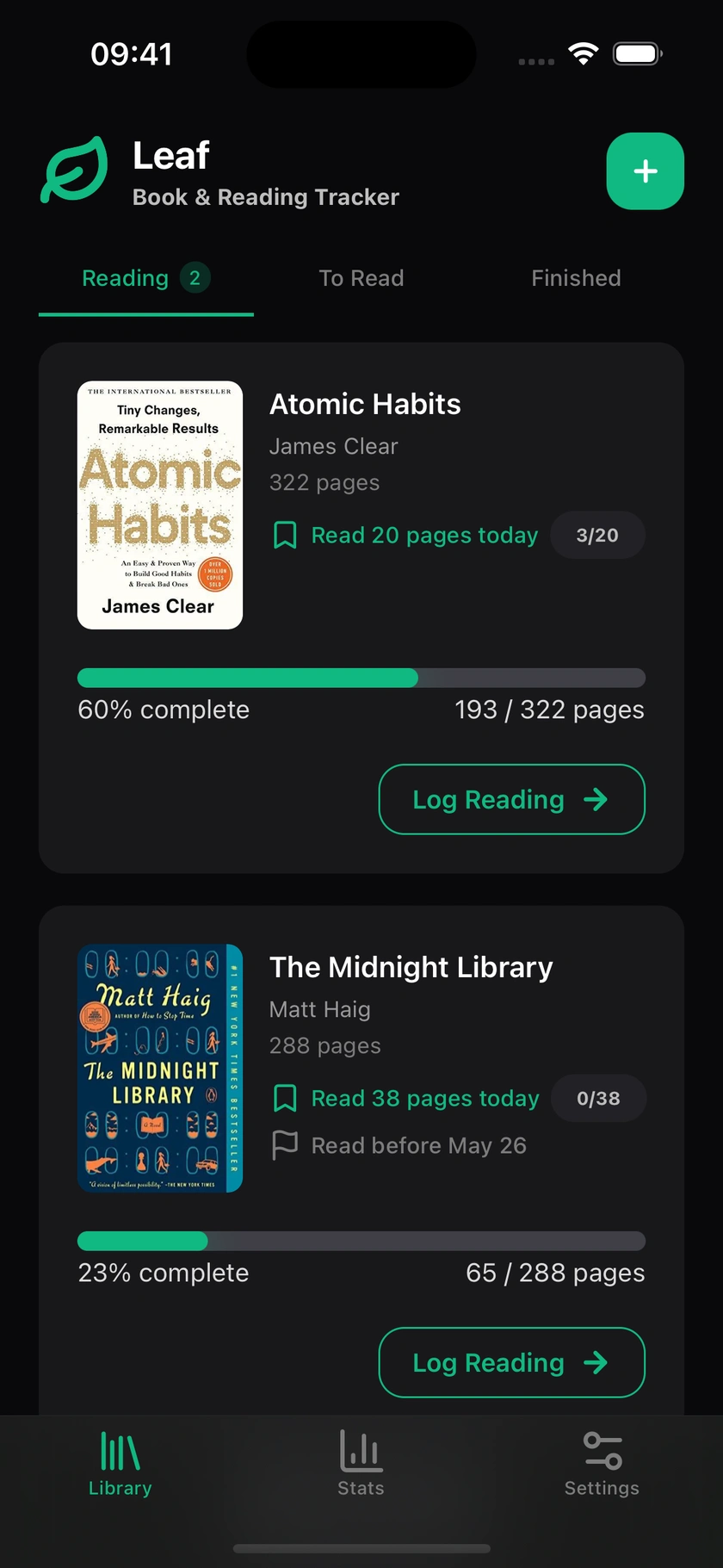
A personal library app for books keeps everything you've read, are reading, and plan to read organized in one place. Leaf is a personal library app for books that works the way your instincts do: pile up the books you want to read, work through the current one, and keep a record of everything finished.
Free book library app
Manage your TBR list, scan ISBN to add books, and import your full Goodreads library.

Your TBR list: a running pile of what's next
The TBR (to-be-read) list is where book recommendations go to wait. Every reader has one: a stack of physical books, a list in Notes, a folder of saved tweets. In Leaf, your TBR is a proper part of your library. Add a book you want to read, set its status to "Want to read," and it waits there until you're ready. You can browse your TBR list at any time and pick what to read next. When you start a book, you can set a reading goal to stay on track. The list grows as you discover new books, and shrinks as you work through them.
Add books by searching or by scanning the barcode
Adding a book to your Leaf library takes about five seconds. Search by title or author and select from the results. Leaf pulls cover images, page counts, and author names from its book database. If you have a physical book in hand, you can scan the ISBN barcode on the back cover and Leaf finds it instantly. No typing required. This makes it easy to add books as you encounter them: in a bookstore, at a library, when a friend recommends something. Each day you log pages toward a book builds your reading streak.
Organize by status
Your Leaf library has four statuses: Reading (your current book), Want to Read (your TBR), Finished (completed books), and Dropped (books you started but didn't finish). Dropping a book isn't a failure. It means you gave it a fair shot and decided your time was better spent elsewhere. Changing status is a single tap, and your library always reflects exactly where you stand with every book you own. Every book you finish is counted in your reading stats.
Import your Goodreads library
If you've been tracking books on Goodreads, you can import your entire reading history into Leaf in a few taps. Goodreads provides a CSV export of your library. Leaf reads that file and recreates your shelves, reading statuses, and dates in your new library. Most libraries import in under a minute. You don't lose years of reading history when you switch. See how Leaf compares as a Goodreads alternative.
Export your library anytime
Your book collection belongs to you. Leaf lets you export your entire library as a CSV file at any time. No paywall, no data hostage. The export includes every book, its status, dates, current page, and cover URL. You can open it in a spreadsheet, import it into another app, or just keep it as a backup. Data portability is part of Leaf's privacy-first approach.
Filtering your library by status
Your Leaf library is always filtered by status. Tap a status tab and you see only the books in that category. Reading shows what you are actively working through. Want to Read is your TBR pile. Finished is your completed shelf. Dropped is for books you started but set aside. Each view is immediate and clear. There is no search required to find your current book, no scrolling through hundreds of titles to see what you have finished. The status system keeps your library organized without any manual effort.
Rate the books you finish
Once you finish a book, Leaf lets you rate it on a half-star scale, from half a star up to five. The rating is private: no one sees it, and it is never compared to others. It takes one tap and is never required. But rating your books turns your finished shelf into more than a list of titles and dates: your ratings power your tier list and your month and year in review, and they carry over when you import from or export to Goodreads. For readers who want to remember how a book actually felt, the rating is the simplest way to capture it.
Searching your library
As your library grows, finding a specific book gets harder by scrolling alone. Leaf includes a search function that lets you find any book in your library by title or author. Results appear instantly as you type. The search covers all statuses at once, so you can find a dropped book just as easily as a finished one. For readers with large libraries migrated from Goodreads, this makes the collection genuinely usable rather than just a long list.
Importing from CSV
Beyond Goodreads, Leaf supports importing books from any CSV file. If you have been tracking your reading in a spreadsheet, a previous app, or any other tool that exports CSV, you can bring that data into Leaf. The import reads the title, author, ISBN, reading status, and current page from the file. Duplicates are detected and skipped automatically. This makes Leaf a flexible destination for your reading history regardless of where it started. See the full import and export guide for the exact format.
Frequently asked questions
How do I add books to Leaf?
Search by title or author from the library screen, or scan the barcode on the back of a physical book. Leaf fills in the title, author, cover, and page count automatically.
Can I scan an ISBN barcode to add a book?
Yes. The barcode scanner is available on the add book screen. Point your camera at the ISBN barcode on the back of any book and Leaf will identify it and fill in all the details.
Is there a TBR list in Leaf?
Yes. Any book with the status "Want to Read" appears in your TBR list. You can browse your TBR, pick your next book, and start reading with one tap.
Can I import my Goodreads library into Leaf?
Yes. Leaf supports CSV imports from Goodreads. Export your library from Goodreads, import the file in Leaf, and your reading history, statuses, and dates come with it.
How many books can I add to Leaf?
There is no limit. Leaf supports libraries of any size, from a handful of books to thousands.
Can I export my library from Leaf?
Yes. You can export your full library as a CSV file at any time from the Settings screen. The export includes every book, its status, start and finish dates, current page, and cover URL. No paywall, no restriction.
Is my library backed up?
By default, your library lives on your device only. If you want a backup, enable Leaf Pro, which syncs your entire library to a secure cloud. You can also export a CSV at any time as a manual backup that you control.